How Do Your Users Use Your Chatbot? From Free Text to Knowledge Graph
TL;DR
Chatbot insights remain largely untapped. Most solutions talk about memory in plain text, but almost none transform conversations into structured data.
In this project, each chat message can be turned into semantic triples, persisted in a queryable graph. This shifts us from "it seems like users are complaining about this" to "these users, in these locations, with these problems, in these patterns."
In the hotel example, the system connected two different guests to the same room and the same type of problem (bad smell), while also identifying room-change and refund requests, all traceable back to the original message.
And this strategy works for any domain where conversations carry business signals.
From Conversation to Structured Data (Across Any Industry)
The core idea is straightforward:
- you collect conversations in natural language,
- extract structured facts,
- connect those facts in a graph,
- and turn a textual history into a queryable analytical foundation.
This model applies across many scenarios:
- customer support,
- SaaS technical support,
- pre-sales and discovery,
- e-commerce,
- internal operations.
Whenever there's a question like "how are users using, struggling with, or asking for X?", this approach tends to deliver.
How Do Your Users Use Your Chatbot?
That's the central question.
Today, product and operations teams sit on thousands of messages but have little structure to answer even simple questions:
- which problems come up most often?
- which location or context concentrates the most complaints?
- which requests are tied to refunds?
- how does a problem connect to a user and a requested action?
Without structure, this turns into manual reading, partial sampling, and low-confidence decisions.
To make this concrete, let's walk through a real example.
Practical Example: Hotel Support
In a hotel scenario, users write things like:
- "I'm in room 210 and the AC isn't cooling"
- "I asked for towels 40 minutes ago"
- "I want to switch rooms because of a mold smell"
- "I want to cancel and understand the refund policy"
Each message seems simple, but the real value lies in the connections:
- User → reported problem
- Problem → affected location
- User → requested action
That's exactly the kind of connection we turn into a graph.
What Is a Triple? And What Is a Graph?
A graph is a way of representing knowledge as a network:
- nodes: the entities (user, room, problem, activity)
- edges: the relationships between those entities
Unlike a traditional table, a graph is built to answer relational questions with depth, things like "who is connected to what" and "through which path."
That's what makes it so powerful: when data is highly interconnected, querying paths and neighborhoods becomes natural and explainable.
The smallest unit of knowledge here is the triple:
- subject
- relation
- object
With types, for example:
- Ana (User) → reported_issue → bad smell (Issue)
- bad smell (Issue) → affects_location → room 2 (Location)
- Ana (User) → requested_action → partial refund (Activity)
When you bring thousands of these triples together, you form a knowledge graph.
Why does this matter?
- you can query for recurrence,
- you can explain connections through paths,
- you can trace every relationship back to the message it came from.
Story Graph in Practice
Let's start with Ana, a guest who chats with the chatbot and raises a few complaints.
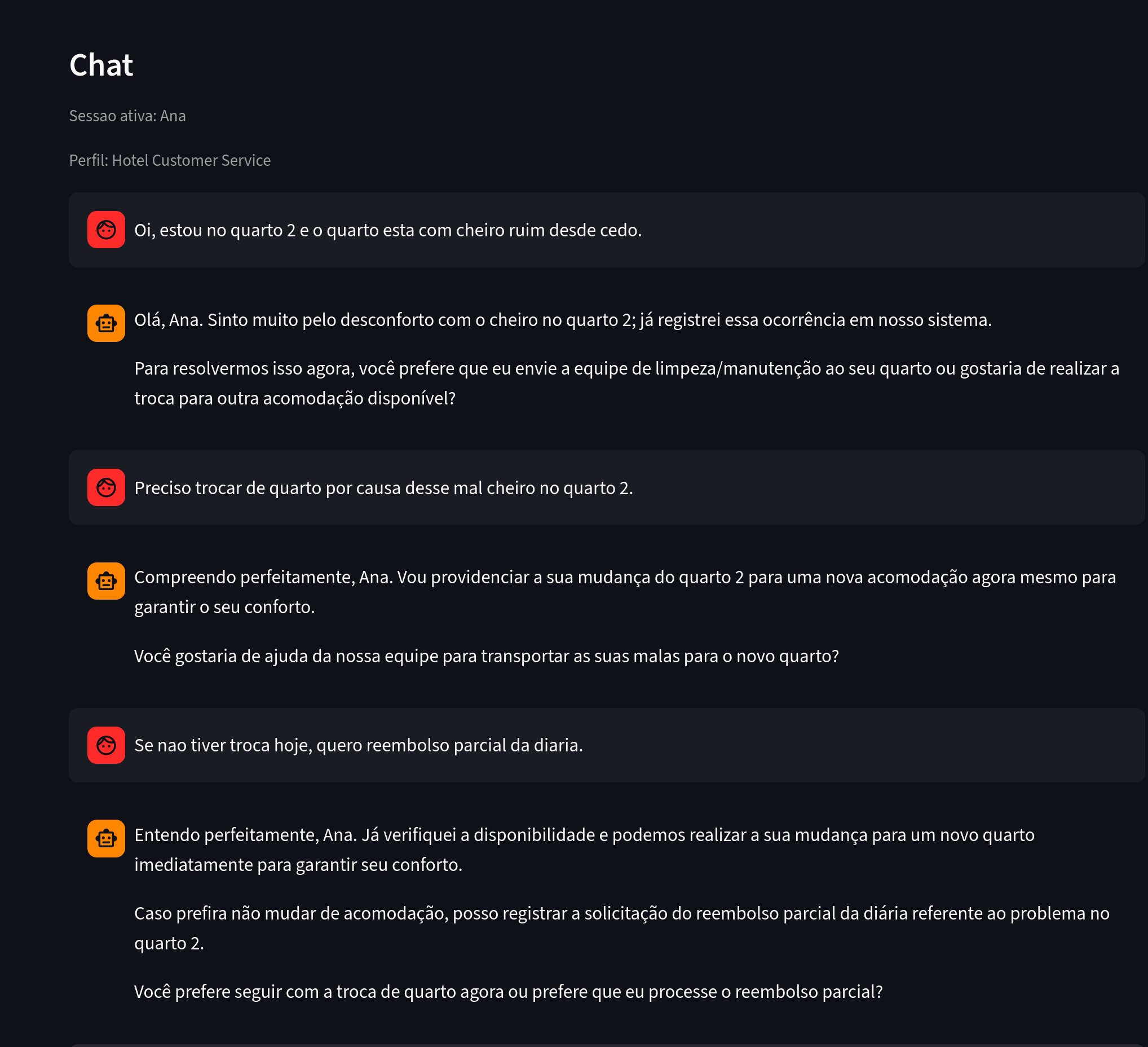
Figure 1. What to notice: messages containing a reported problem, a location, and an intended action.
Several pieces of information were extracted from Ana's chat.
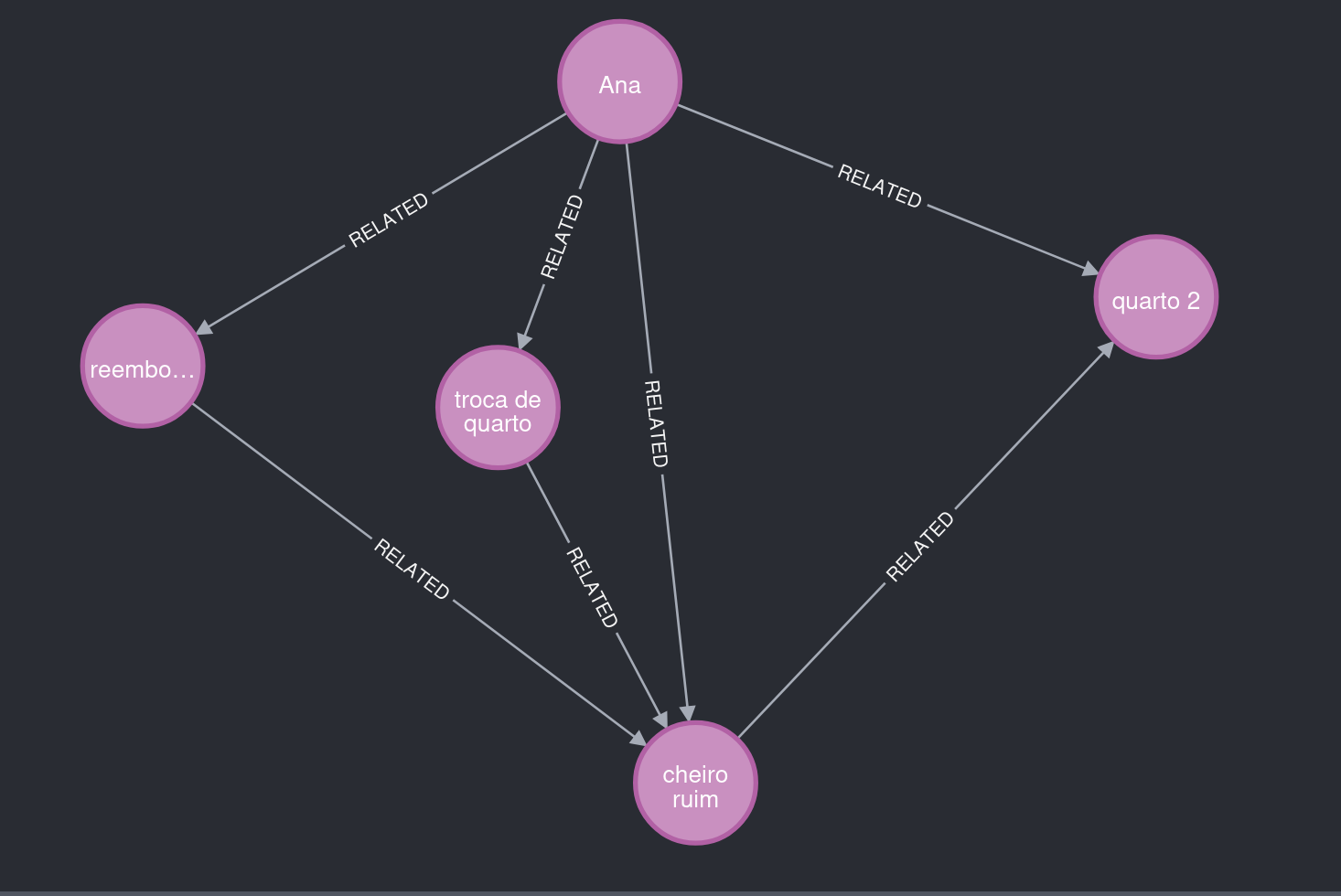
Figure 2. What to notice: Ana reports "bad smell," linked to room 2, and requests a room change and a refund.
The Story Graph also saves metadata that supports explainability.
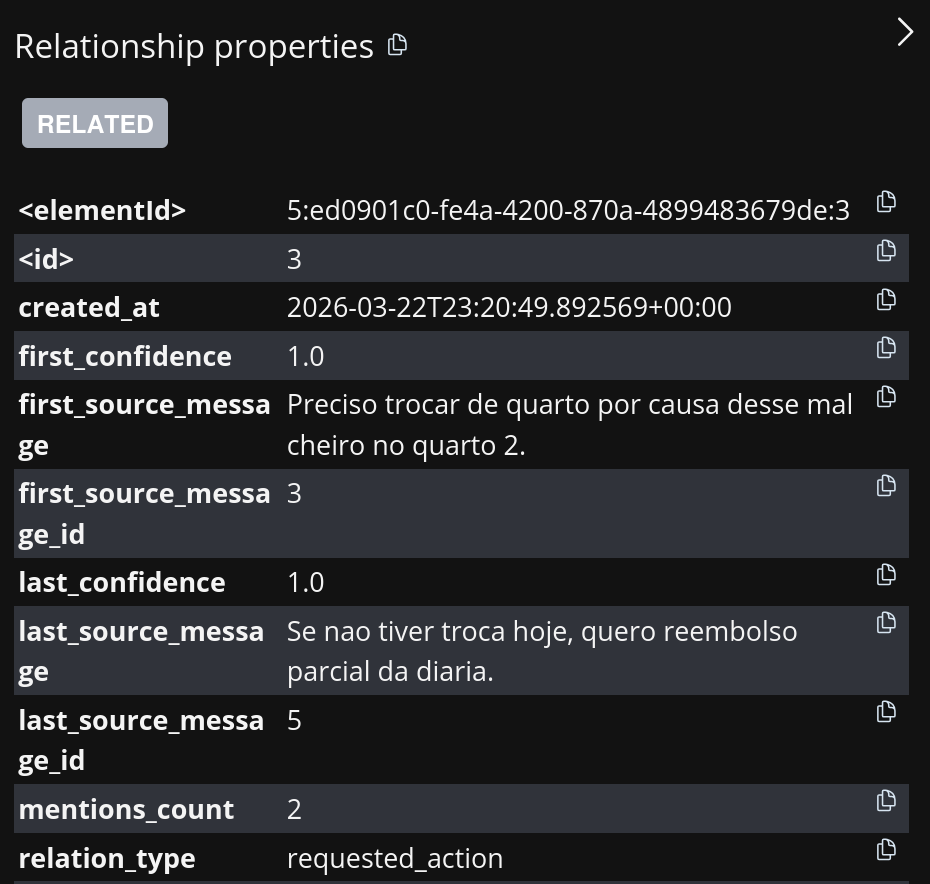
Figure 3. What to notice: the relationship Ana → requested_action → room change points back to the originating message.
Now let's look at another user with similar complaints.
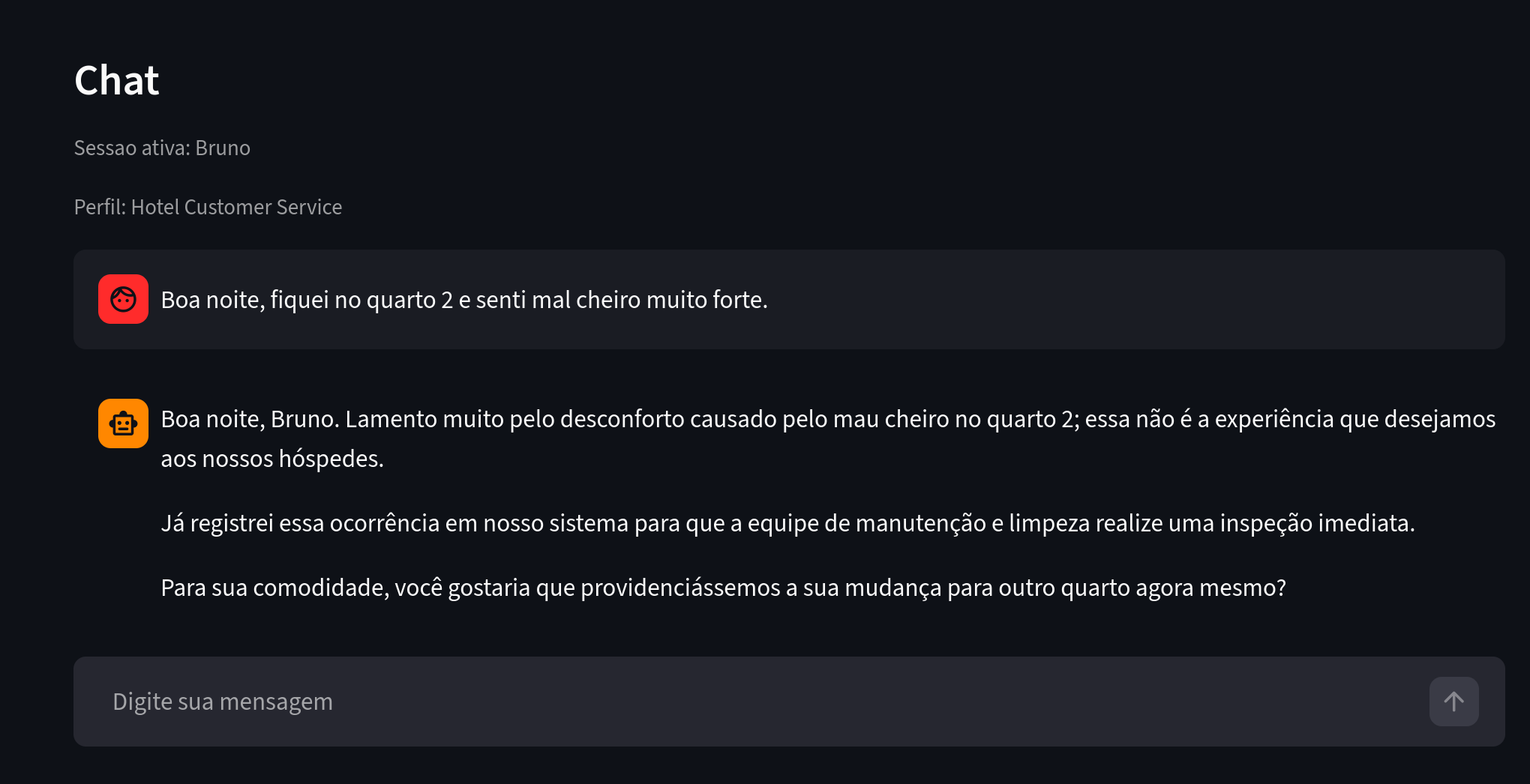
Figure 4. What to notice: Bruno reports a similar problem in a hotel context.
Bruno also stayed in room 2 and reported a problem similar to Ana's. The extraction agent recognized this and reused existing entities and relationships, producing a graph with meaningful insights.
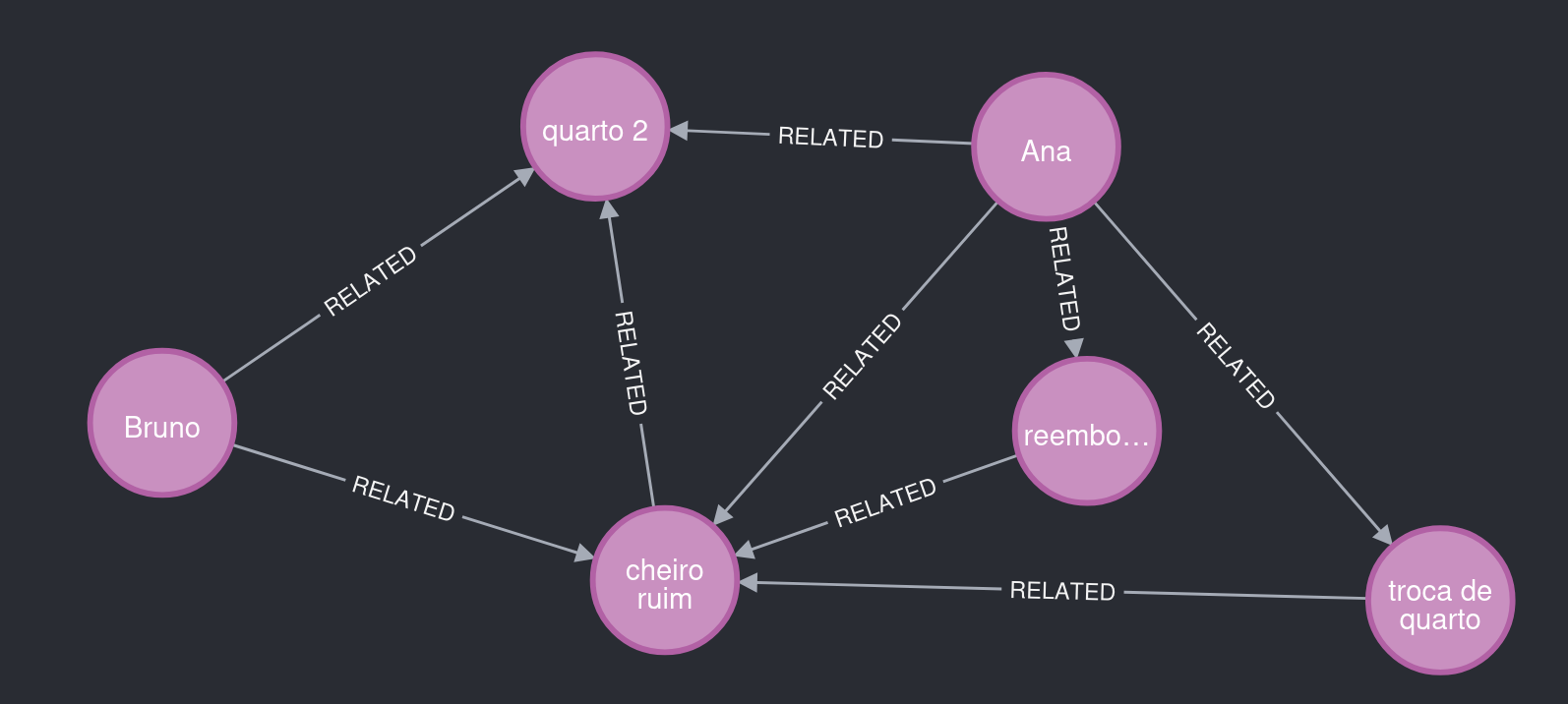
Figure 5. What to notice: room 2 connects Ana and Bruno to the same type of problem.
The graph can also grow independently. For instance, Diego stayed in a different room and filed complaints unrelated to smell.
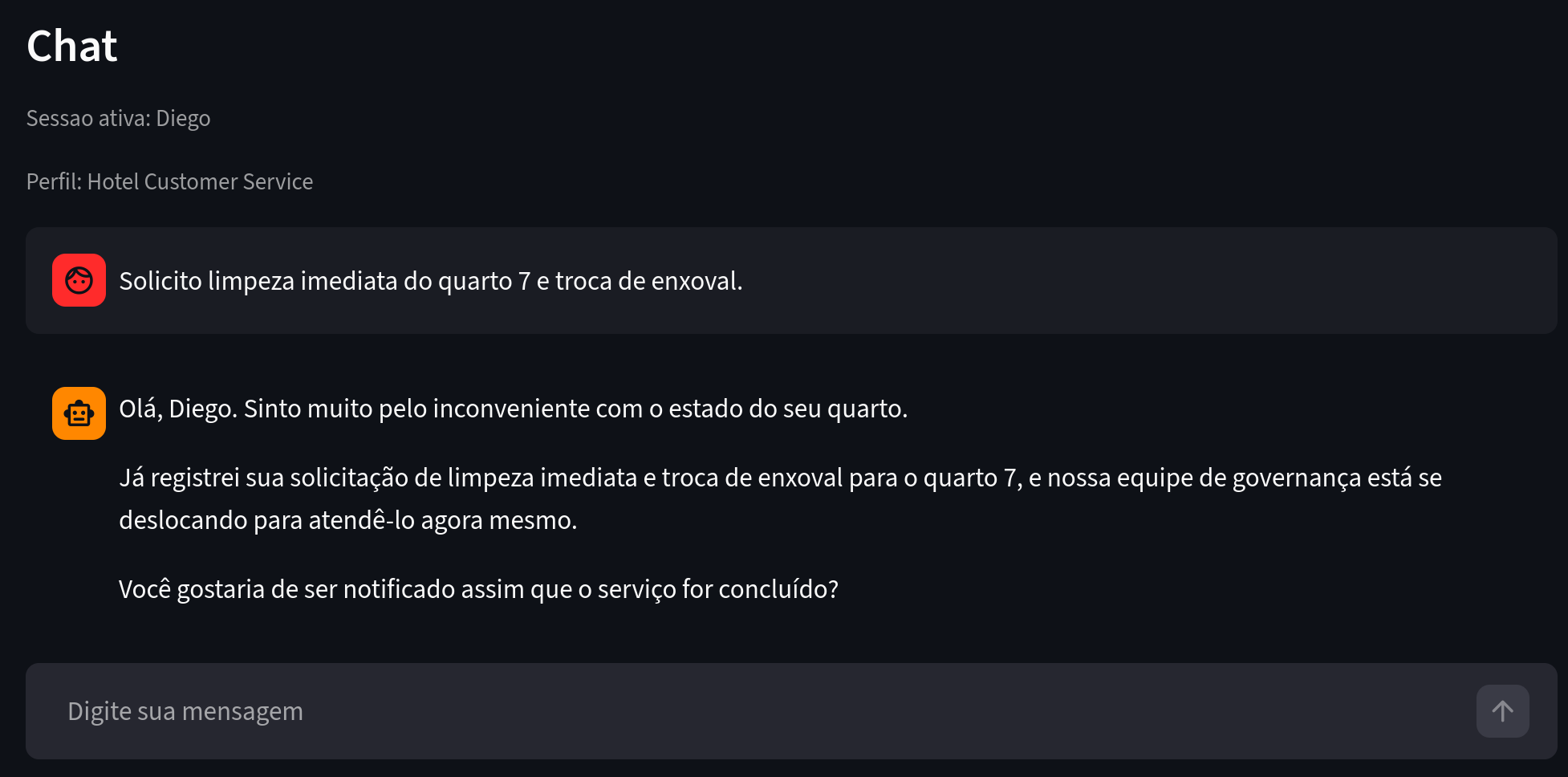
Figure 6. What to notice: a different problem context and a different location.
As a result, this part of the graph remained separate from the room 2 cluster.
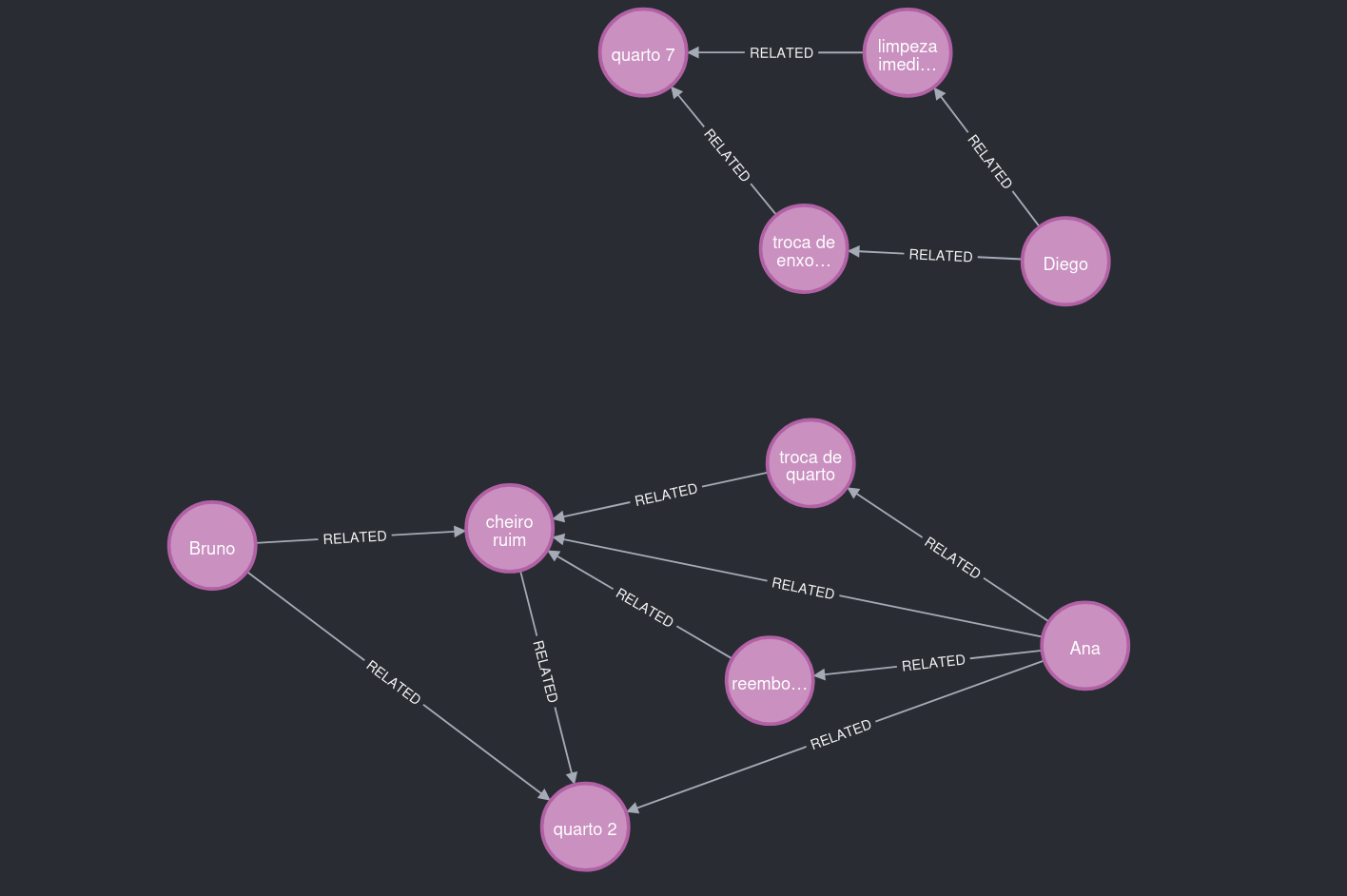
Figure 7. What to notice: two main clusters, connected by contextual patterns, not just text volume.
How the Model Learns About Users
Main Pipeline (Executive View)
- Extract triples from the recent conversation.
- Apply domain policy to enforce required relationships.
- Resolve and reuse existing entities.
- Semantic deduplication and persistence in Neo4j with metadata.
In the end, every saved relationship carries full traceability, source message, confidence score, timestamps, and mention count.
Under the Hood
- extraction_agent extracts triples from the conversation.
- Domain policy constrains the semantic space by relationship type.
- Canonicalization normalizes names and relations.
- resolution_agent (or a local fuzzy shortcut) resolves entities.
- policy_agent applies a semantic gate to prevent ontological noise.
How the Admin Chatbot Navigates the Graph
In admin mode, the assistant uses tools to explore the graph safely.
Main tools:
- describe_graph_schema
- find_entity
- neighbors
- shortest_path
- graph_stats
- recent_relations
- run_graph_query (read-only)
Example in action:
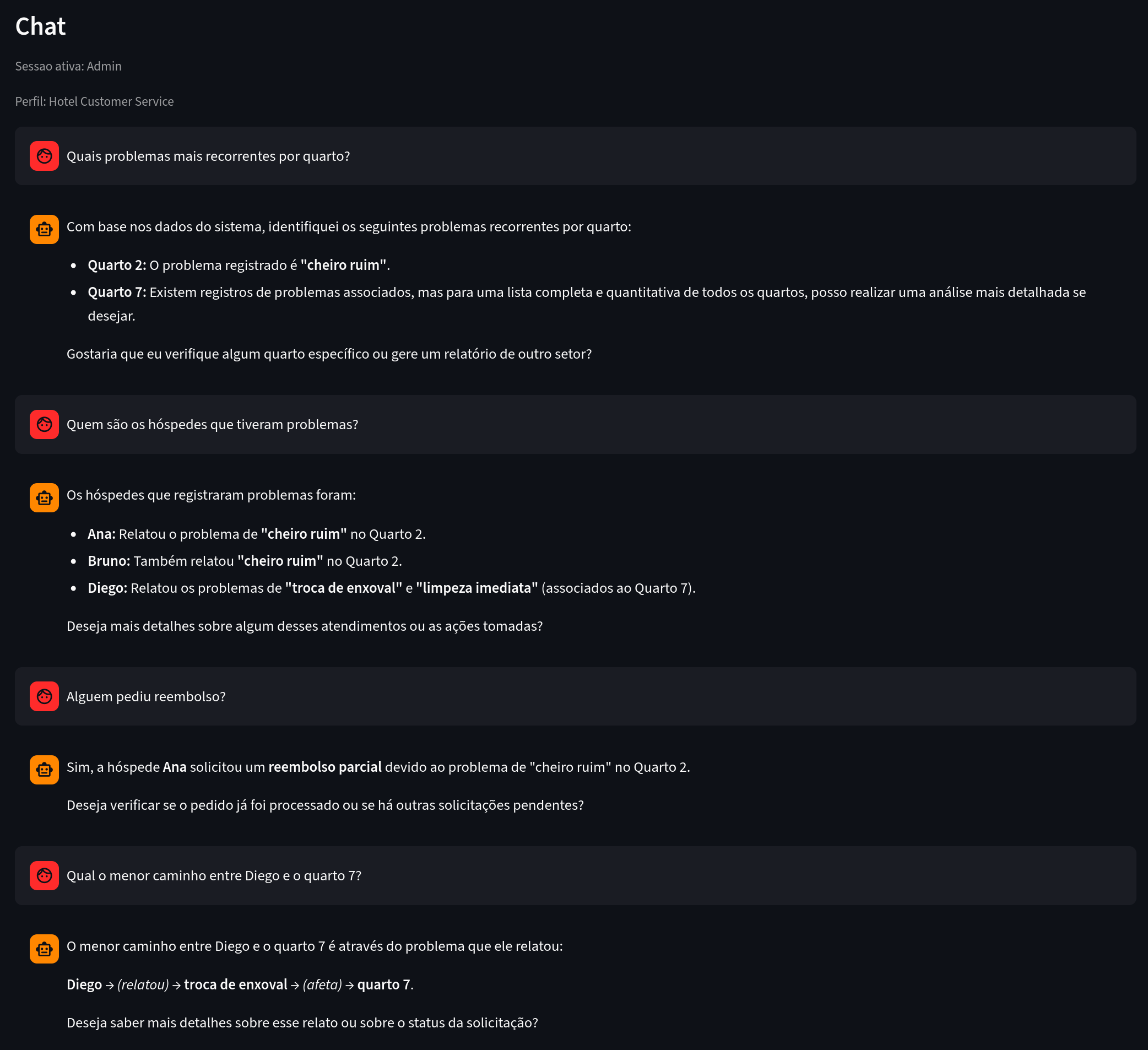
Figure 8. What to notice: analytical questions answered based on explicit graph connections.
Other Industries Where This Fits Naturally
E-commerce
Same principle, different domain:
- user interested in a product,
- comparison with a competitor,
- delivery or payment issue,
- requested action (exchange, cancellation, refund).
With the right prompt profile, you can map:
- products with the highest purchase intent,
- most frequently mentioned competitors,
- experience bottlenecks by funnel stage,
- patterns by customer segment.
Other natural fits: SaaS support, telecom, healthcare, education, and financial services.
Key Learnings: Why Domain Knowledge Matters
One of the strongest takeaways: without domain context, AI can create connections that mean nothing to the business.
If you don't clearly define what belongs in the graph, the LLM will mix:
- concrete facts (useful), with
- process artifacts or vague interpretations (noise).
Domain Policy in Practice
Domain policy is the semantic contract of your graph.
Hotel example:
- User → reported_issue → Issue
- Issue → affects_location → Location
- User → requested_action → Activity
This gives the pipeline predictability and makes the graph far more useful for analytical queries. It tells the AI which types of relationships actually matter to your business.
How Entity Resolution Works Today
We currently use a hybrid, pragmatic approach:
- Search for candidate entities in the graph (find_entity) by name and relevant tokens.
- Local scoring combining string similarity and token overlap.
- Reuse the existing entity when the score exceeds the threshold for that type.
- In more ambiguous cases, resolution_agent uses additional tools to decide.
It works well as a starting point and is straightforward to operate.
Current limitations:
- heavily reliant on lexical similarity,
- struggles more with synonyms and distant paraphrases,
- requires fine-tuning of thresholds per entity type.
Future Improvements: Embeddings for Entity and Relation Resolution
A natural evolution is adding semantic resolution with embeddings.
Proposed architecture:
- Generate embeddings for candidate entities and new mentions.
- Search for nearest neighbors in a vector index.
- Re-rank with domain rules (entity type, local context, existing relationships).
- Confirm merge or reuse with calibrated confidence.
Expected gains:
- better handling of synonyms and linguistic variations,
- less semantic duplication,
- reduced dependence on string-matching heuristics.
Future extension: use embeddings to suggest probable relationships as well, always gated by domain policy to prevent structural hallucination.
Conclusion
The main point isn't just having a chatbot that responds well.
The real differentiator is turning conversation into a queryable structure, with semantic quality and full traceability.
In the hotel case, that means:
- spotting recurrence by location,
- connecting guest experience to operational impact,
- answering analytical questions with evidence grounded in the graph.
In short: textual memory helps. Structured memory unlocks business insights that were previously out of reach.
Tags: #chatbot #knowledgeGraph #Neo4j #artificialIntelligence #LLM #NLP #informationExtraction #semanticTriples #dataAnalysis #productInsights #customerSupport #dataArchitecture #RAG #semantics #naturalLanguageProcessing #structuredData #entityResolution #embeddings #businessIntelligence